
What’s new in CareLineLive?
When you’re running one small team, you can keep quality high just by knowing everyone. Once you’re at 50, 100 or 250 carers across several branches, that stops working. Standards start to vary between offices, information sits in different places and managers spend more time chasing records than improving care.
Over the last few months, we’ve released a set of updates built for this stage of growth. They make care quality easier to track, medication safer to manage and oversight easier to evidence, so every branch runs to the same standard from one place.
Here are the updates:
- Client Assessments Matrix: see every client’s assessment status in one table
- Body maps for carer concerns: pinpoint exactly where on the body a concern applies
- PRN (as required) medications: record medication given as needed, with built-in dose safeguards
- Interactive eMAR: view, complete and sign off MAR charts on screen
- Task Audit Report: track pass and fail audits across task and medication completions
- Medication Completions Report: export scheduled and PRN medication data in one place
- Reports in Excel: take your data into Excel without re-keying
- Late Round Alert: know quickly when a round genuinely hasn’t started
Below, we explain what each one does and how it helps your team and your business as you grow.
Client Assessments Matrix
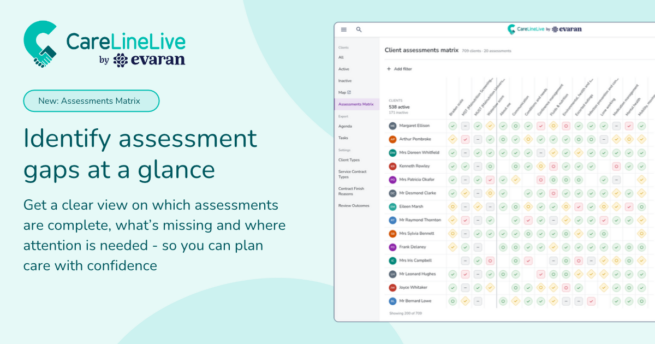
As your client list grows, keeping every assessment up to date gets harder, especially when different coordinators look after different groups of clients. The new Client Assessments Matrix, under Clients → Assessment Matrix, shows every client against every assessment type on one screen. You can see who’s overdue, who’s due soon and who’s up to date without opening each record.
Why it matters for growing providers: Save hours of management time each week by replacing manual assessment tracking and chasing with one clear view of what’s complete, overdue or needs attention.
Body Maps for carer concerns
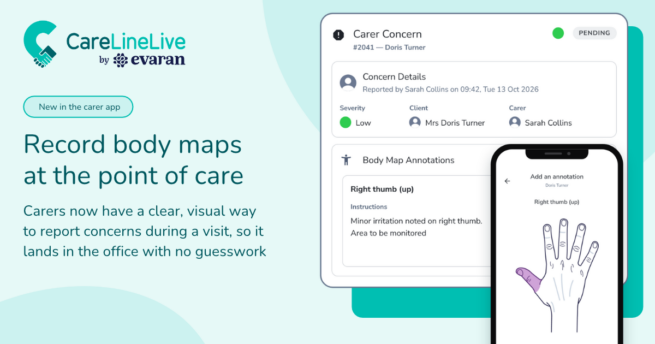
When a carer reports a physical concern, such as a bruise, a sore area or a new mark, a written description often leaves the office guessing where on the body it is. That gets worse as more carers, coordinators and clinicians are involved in the same client’s care. Carers can now mark the location on a body map when they report the concern. The annotation travels with the concern into the management portal and onto the client’s body map.
Why it matters for growing providers: Office staff spend less time phoning carers back to ask where a mark is or what it looked like. Clinicians can triage concerns straight away instead of waiting for more detail. Spotting pressure damage and skin changes earlier helps prevent escalations, hospital admissions and safeguarding investigations, which are costly in both staff time and client outcomes.
PRN medications
PRN is now available to everyone
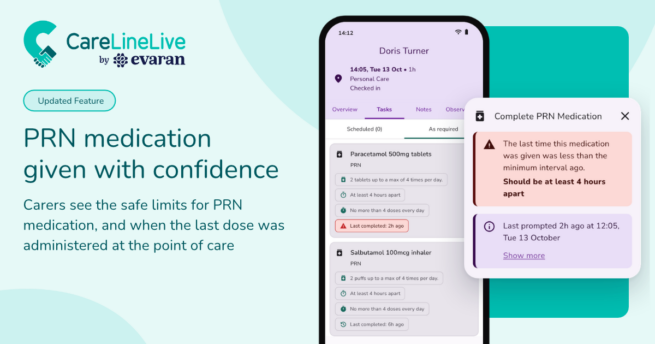
PRN, from the Latin pro re nata, means “as needed”: medication given only when it’s required, such as for pain or another symptom. Until now, CareLineLive treated every medication as scheduled, so as-needed doses had to be recorded around a routine that assumed a fixed time. With more carers giving more doses, that left room for inconsistency.
PRN now has its own workflow. You set safe limits in the office and carers see those limits and their recent administrations when they decide whether to give a dose.
You can find more information in our support articles.
Why it matters for growing providers: Office teams no longer have to find and fix PRN doses recorded in notes or in the wrong place. Dose limits are built in, so managers spend less time checking whether doses were safe and carers don’t have to ring the office before giving one. Fewer medication errors also means fewer incident investigations, less time spent on safeguarding referrals and less risk to your reputation with commissioners.
Interactive eMAR and medication audits
The interactive eMAR turns your MAR charts into a live, clickable view, so you can see the state of every client’s medication at a glance. Simple colour codes and symbols show what’s been given, what’s due and what’s overdue, so missed or late doses are flagged before they become a problem.
Your team can record completions, doses, comments and reasons directly from the chart. Built-in medication audits let you sign off records in a few clicks and any failed audit is clearly flagged so it gets followed up.
Why it matters for growing providers: Managers review, correct and sign off medication records from one screen, without switching between views or chasing paperwork. Audits that used to take a morning can be done in a few clicks. Missed or late doses are flagged straight away, so problems are fixed before they turn into incidents that take hours to investigate.
Task Audit Report
The more carers and visits you have, the harder it is to know whether audits are actually happening. The new Task Audit Report gives you one view of the audit status of every task and medication completion: what’s passed, what’s failed and what still needs checking. Choose a date range and filter by Pass, Fail or No status to go straight to what needs attention.
Audits completed on the interactive eMAR are pulled in automatically, so there’s no duplicate admin and nothing slips through.
Why it matters for growing providers: Senior managers don’t have to ask each branch for audit updates or merge results by hand. Filtering by Pass, Fail or No status takes you straight to what needs action. eMAR audits come through automatically, so nobody records the same audit twice. That frees up management hours every month and your governance evidence is ready whenever an inspector asks.
Medication Completions Report
The Medication Completions Report brings all medication activity into one place, covering both scheduled and PRN medications. Choose a date range and teams to see exactly what’s been given and when, or narrow it down to a single client when you need to look closer. It sits alongside the familiar Task Completions Report, so it fits the way you already work. You can export results as a CSV or PDF in seconds.
Why it matters for growing providers: Putting together medication evidence for a client review, commissioner request or inspection takes seconds rather than hours. With scheduled and PRN data in one export, nobody has to pull information from different places or rebuild reports by hand. That’s admin time your office team can spend supporting carers and clients.
Reports in Excel
As you grow, more of your reporting happens outside the Management Platform: board packs, branch comparisons, commissioner returns. Reports across the platform are becoming exportable straight to Excel, so you can sort, filter and analyse your data without re-keying anything. In this release, Excel export is available for:
- Client Suspended Visits
- Client Vaccinations
- Carer Vaccinations
- Client Suspensions
- Client Reviews
- Carer Attendance
- Carer Requirements
- Demographics
- Carer Reviews
Why it matters for growing providers: Your team stops copying data between systems by hand, which saves hours every week and cuts out re-keying errors. Board packs, branch comparisons and commissioner returns are quicker to produce and you may not need extra admin staff as reporting grows with you.
Late Round Alert
Carers don’t always complete rounds in the order they’re scheduled, which makes it hard to tell at a glance whether a round has started. With more rounds running across more areas, false alarms waste coordinator time and real problems can be missed. The new alert checks the status of every booking in the round, not just the start time of the first one, so you get an accurate picture of what’s happening.
The alert needs to be configured before it’s turned on, so you can set it up to suit the way your service works.
Why it matters for growing providers: Coordinators spend less time checking up on rounds that have actually started, so they can deal with the ones that haven’t. Acting quickly on a genuinely late round helps you avoid missed visits, which can mean complaints, lost commissioner confidence, contract penalties and calls to cover care at short notice.
Get started
All of these features are live in CareLineLive now, and more are on the way.
Growing shouldn’t mean losing the consistency you had when you were smaller. CareLineLive brings rostering, compliance, medication, payroll and family communication into one platform, so your care business runs to the same standard from one place, however many branches you have.
The best way to see how CareLineLive can support your growth is to see it in action. We tailor every conversation to your business rather than showing a generic video.
So we can get to know you and your business goals, please request a discovery call with one of our friendly and knowledgeable team. Alternatively, you can call us on +44 (0)3300 885 767